AdAdvisor’s recommendation engine is the core of the platform. When you hit “Generate Recommendations,” a multi-agent AI pipeline analyzes your campaign data across multiple time windows, compares it against your business metrics, and produces specific, prioritized actions you can take to improve performance.

What triggers recommendation generation?

Recommendations are generated on-demand. You click the Generate Recommendations button on either the dashboard or the Ads Manager page. The AI runs its analysis and delivers results within a couple of minutes.
You can generate recommendations once every 24 hours. The button shows when your next generation will be available.

What data feeds the AI?

The recommendation engine looks at a lot of data before making suggestions:

Campaign performance

  • Daily metrics across multiple time windows: 3 days, 5 days, 7 days, 15 days, and 30 days
  • Statistical analysis for each window: averages, medians, standard deviations, trends, volatility
  • Metrics include: ROAS, CPA, CPC, CPM, AOV, spend, revenue, impressions, frequency, CTR, and conversions

Your business context

Historical recommendations

The AI checks what it recommended before, how you responded, and what happened after. If you accepted a recommendation, the AI looks at how your performance changed as a result. That feedback loop helps it make better suggestions over time. If you rejected something, it factors that in too. And it won’t suggest the same thing again while it’s still waiting for results from a previous recommendation.

Types of recommendations

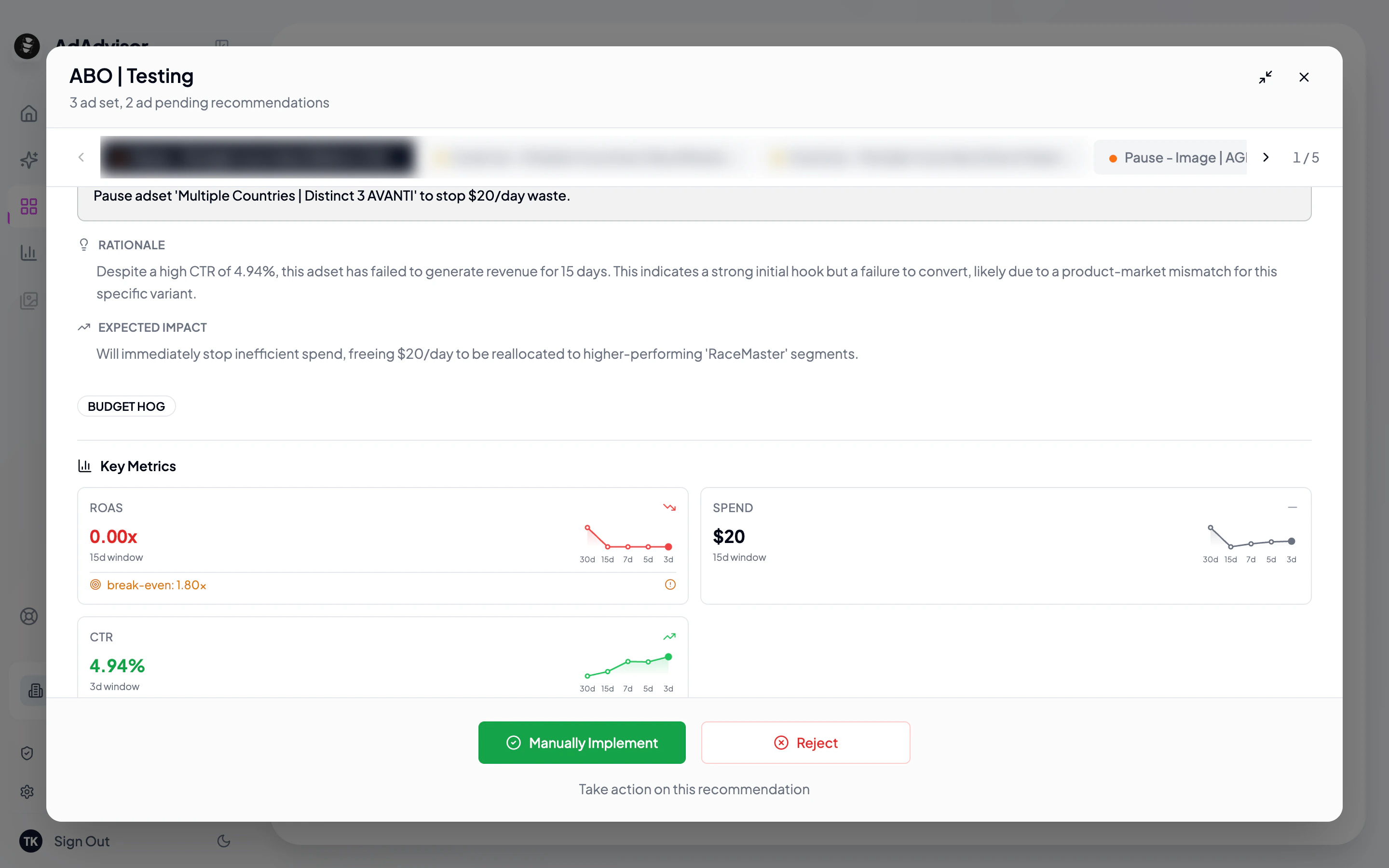
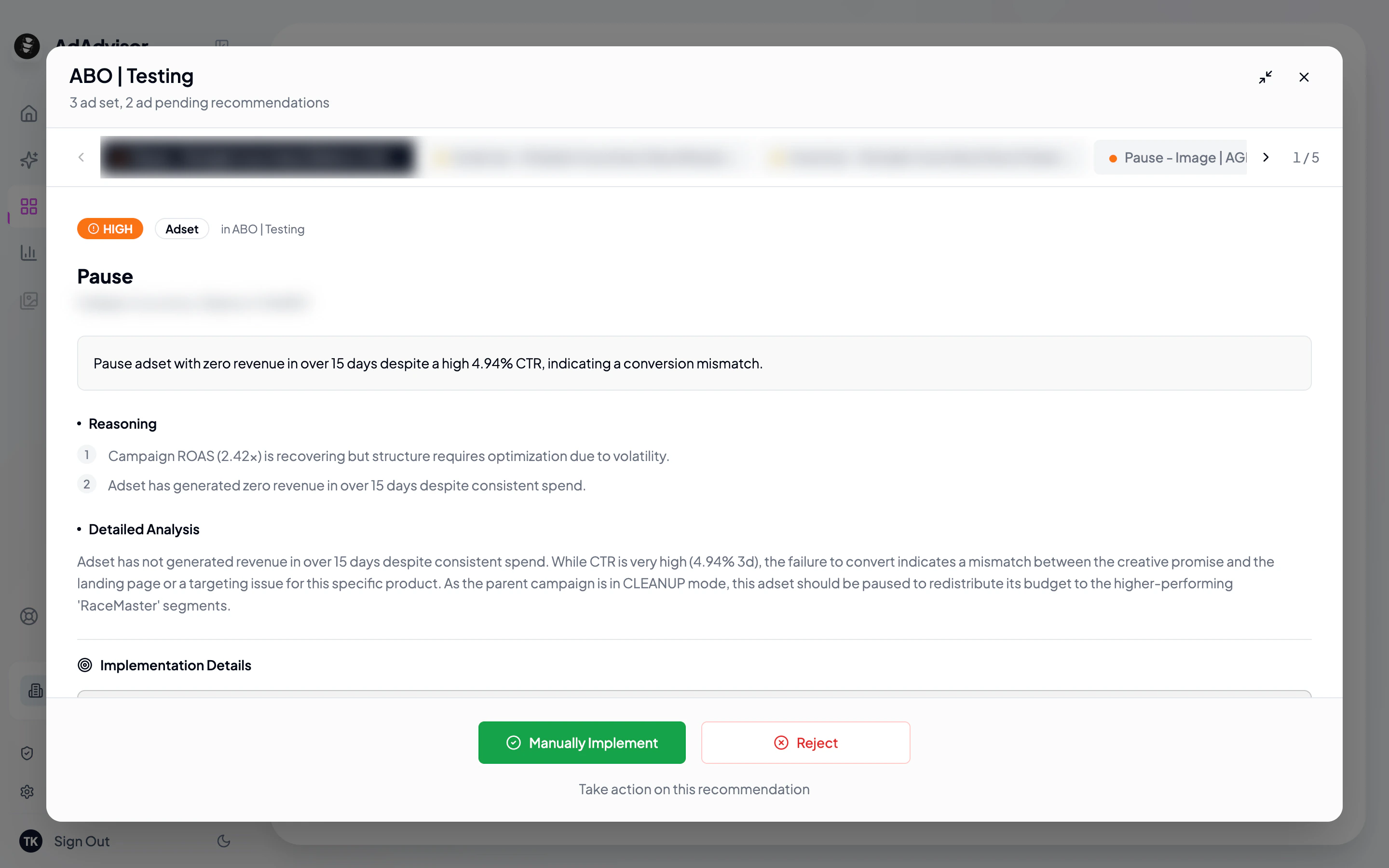
Here’s an example of what a recommendation card looks like in AdAdvisor:
Recommendation card top
Recommendation card bottom
The AI can suggest many different actions, grouped into categories:

Budget actions

ActionWhat it means
Scale UpIncrease daily budget for a high-performing entity
Scale DownDecrease budget for an underperformer
PauseTemporarily pause an entity
ShutdownPause a campaign permanently

Creative and audience actions

ActionWhat it means
Refresh CreativesReplace or update ad creatives showing fatigue
Fix Audience FatigueAdjust targeting to combat saturation
Fix FunnelOptimize the conversion funnel
Fix AOVAddress declining average order value

Structural actions

ActionWhat it means
Duplicate CampaignClone a top performer into a new campaign
Duplicate Ad SetClone a top-performing ad set
Create CampaignBuild an entirely new campaign
Create Ad SetAdd a new ad set to an existing campaign
Create CreativesGenerate new creative assets
Clean UpRemove underperforming ad sets and ads

Monitoring

ActionWhat it means
MaintainKeep doing what you’re doing. The AI is monitoring but no changes needed.

Priority levels

Every recommendation is assigned a priority:
PriorityMeaning
CriticalAct now. Performance is suffering or money is being wasted.
HighAct soon. There’s a clear opportunity or a growing problem.
MediumWorth doing when you have time. An optimization that will improve results.
LowNice to have. Minor improvement or something to keep an eye on.

What’s next?

Last modified on February 28, 2026